2026 Best Server Cooling Solutions for Global Buyers

Choosing the right Server Cooling Solutions has become a business-critical decision for global data center buyers. Modern racks can exceed 30 kilowatts, while artificial intelligence systems may demand far more. A small cooling mistake can raise inlet temperatures, trigger thermal throttling, and shorten equipment life.

Roger R. Schmidt, a distinguished data center cooling engineer and former IBM researcher, once noted, “Air cooling is reaching its limits as heat densities increase.” His observation remains highly relevant. Traditional computer room air conditioning still works well in many facilities. However, it may struggle beside dense GPU racks, narrow aisles, and uneven airflow.

This 2026 guide examines air cooling, rear-door heat exchangers, direct-to-chip liquid cooling, and immersion systems. It considers efficiency, installation complexity, maintenance access, water consumption, and long-term operating costs. Global buyers also need to examine local climate conditions, energy prices, technician availability, and applicable safety standards.

The details matter. A blocked perforated tile can create a dangerous hot spot. A poorly sealed cable opening can weaken containment. A leaking liquid loop can stop more than one server.

No solution is perfect.

Liquid cooling can improve efficiency, yet it requires trained maintenance teams and careful fluid management. Air systems remain familiar, but their capacity may be overestimated. That assumption deserves scrutiny.

Reliable selection should combine engineering calculations, manufacturer documentation, site testing, and independent verification. This article offers a practical comparison for buyers seeking resilient, efficient, and scalable cooling infrastructure in 2026.
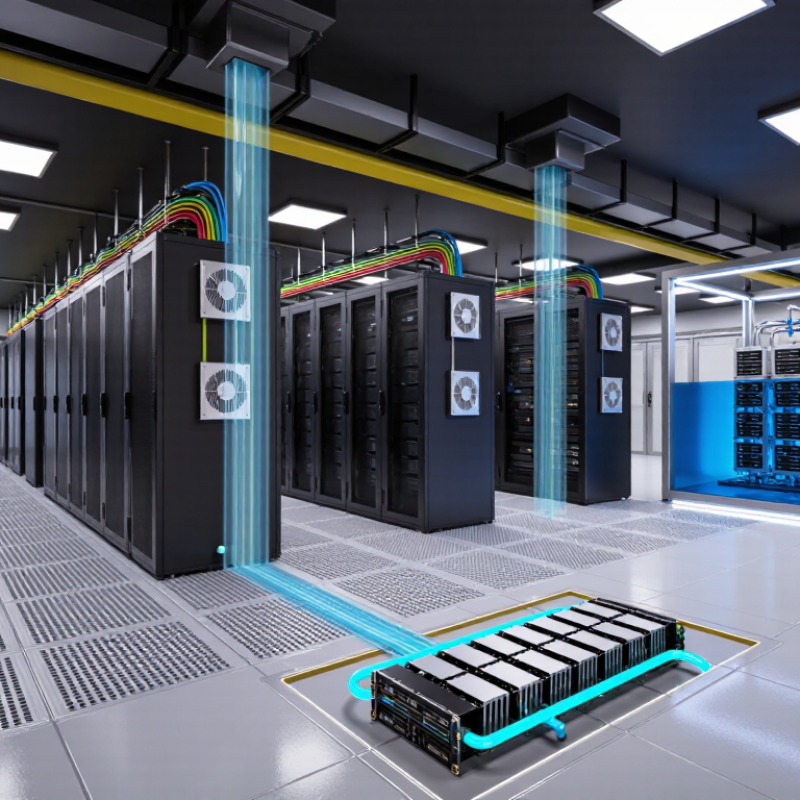
2026 Best Server Cooling Solutions for Global Buyers

Server Cooling Fundamentals and 2026 Market Requirements

Server cooling in 2026 begins with heat, airflow, and operating risk. Modern processors can create concentrated thermal zones inside one rack. Air cooling remains practical for moderate densities, but liquid cooling becomes more relevant as compute intensity rises. ASHRAE TC 9.9 recommends an inlet temperature range near 18–27°C for common data-center classes.

However, temperature alone is not enough. Poor airflow separation can create hot spots beside a cool room sensor. Field commissioning often reveals this gap.

The IEA’s Electricity 2024 report estimates that data centers used about 415 TWh globally in 2024. It projects demand could reach approximately 945 TWh by 2030. Cooling efficiency therefore affects both operating cost and grid pressure. The Uptime Institute Global Data Center Survey 2024 also identifies power availability as a major operational concern. In 2026, buyers should examine cooling capacity, water use, redundancy, maintenance access, and controls together. A single efficiency target is rarely enough. That assumption deserves challenge.

Tips:

Measure rack inlet temperatures, not only room temperatures. Use computational fluid dynamics before major layout changes. Require clear performance data at partial load. Check whether pumps, fans, and controls can operate during maintenance. Review local water restrictions before selecting evaporative systems. Small gaps matter. Real conditions are messier.

Comparing Air, Liquid, Immersion, and Hybrid Cooling Systems

Global server rooms now demand cooling systems that match rising compute density, energy costs, and regional operating conditions. Air cooling remains familiar, serviceable, and relatively simple to deploy. It works well for moderate-density racks with clear airflow paths. However, fans consume substantial power, and hot spots can appear around accelerators or tightly packed processors. In field assessments, blocked aisles and poorly sealed floor tiles often reduce performance more than expected.

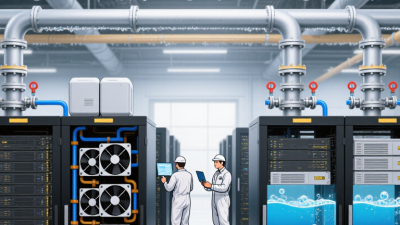
Liquid cooling transfers heat more efficiently. Direct-to-chip systems can support dense processors while reducing fan noise and room airflow demand. They require careful tubing design, leak detection, fluid monitoring, and trained maintenance staff. Immersion cooling goes further by placing servers in a non-conductive fluid. It offers strong thermal stability and quieter operation, but hardware access becomes slower, and fluid handling adds operational complexity. That trade-off is easy to underestimate.

Hybrid cooling combines methods. Air can handle storage racks, while liquid supports high-power computing nodes. This approach may suit facilities expanding in stages, especially where existing infrastructure cannot be replaced quickly. Buyers should compare cooling capacity, water use, maintenance intervals, rack density, power usage effectiveness, and local technician availability. Small details matter, such as drain placement and sensor calibration. No design is perfect. A pilot rack can reveal pressure drops, service delays, and unexpected heat patterns before a wider investment.

2026 Best Server Cooling Solutions for Global Buyers

Comparison of representative rack-density capacity by cooling method. Actual performance depends on server design, ambient conditions, facility infrastructure, and deployment configuration.

Key insight: Air cooling is suitable for conventional low-to-medium density deployments, while direct liquid, immersion, and hybrid systems support higher-density AI, HPC, and enterprise workloads with greater thermal management requirements.

How to Match Cooling Solutions with Server Workloads

2026 Best Server Cooling Solutions for Global Buyers

How to Match Cooling Solutions with Server Workloads

Cooling should follow workload density, not cabinet appearance. General-purpose servers with moderate CPU use can usually rely on well-designed air cooling. Maintain clear hot-aisle and cold-aisle separation. ASHRAE’s thermal guidance places recommended server inlet temperatures around 18–27°C, but local humidity and airflow also matter. A cheap temperature reading can mislead.

AI training and high-performance computing create concentrated heat. These systems often require direct-to-chip liquid cooling or rear-door heat exchangers. The International Energy Agency reported that data centers consumed about 415 TWh of electricity in 2024. Cooling efficiency will influence future capacity. Uptime Institute’s 2024 Global Data Center Survey reported an average PUE of approximately 1.56 among surveyed facilities. That figure is useful, but it is not a universal target.

Small edge sites need different decisions. Their workloads may be lighter, yet dust, unstable power, and limited maintenance access increase cooling risk. Sealed enclosures, variable-speed fans, and remote temperature alerts can be more practical than complex liquid systems. Test the actual workload before purchasing. Laboratory results can disappoint in a crowded rack.

The best design may be imperfect. Leave thermal headroom for software upgrades, seasonal changes, and failed fans. Pair cooling measurements with server utilization data. A 20-kilowatt rack does not need the same solution as twenty lightly loaded servers. Recheck the design after deployment. That is where assumptions usually fail.

Evaluating Efficiency, Reliability, Cost, and Global Compliance

The 2026 Best Server Cooling Solutions for Global Buyers must balance efficiency, reliability, cost, and compliance. The International Energy Agency reported that data centres used about 460 TWh of electricity in 2022. Demand could exceed 1,000 TWh by 2026. Cooling design now affects both operating budgets and grid pressure.

Air cooling remains practical for moderate-density racks and simpler maintenance. Direct liquid cooling can support high-density computing with lower fan energy, but it requires trained technicians and careful leak detection. Uptime Institute’s 2024 Annual Outage Analysis found power-related problems caused about half of reported impactful outages. Cooling redundancy therefore needs independent power paths, tested controls, and accessible replacement parts. A low annual energy estimate may look attractive. That estimate can fail under hot climates, dust, or partial-load operation.

Tips: Compare measured PUE results, not only laboratory claims. Request performance data at 25%, 50%, and 100% IT load. Check local electrical, fire-safety, environmental, and refrigerant requirements before purchase. Ask suppliers how quickly filters, pumps, sensors, and control boards can be replaced in your region. Total cost should include water use, technician training, downtime exposure, and disposal. Global compliance is rarely automatic. Country-specific review is essential, even when equipment carries recognized certifications. I would also challenge every simulation: airflow models often assume perfect rack placement, while real rooms contain empty cabinets, cable openings, and uneven temperatures.

2026 Best Server Cooling Solutions for Global Buyers - Evaluating Efficiency, Reliability, Cost, and Global Compliance
Comparative overview of major data-center cooling architectures. Figures are typical planning ranges for enterprise and high-density deployments; actual results depend on climate, rack layout, water quality, redundancy design, utilization, and local energy prices.
Cooling Solution Typical IT Load Range Typical Rack Density Cooling Efficiency Indicator Reliability and Redundancy Indicative CAPEX Maintenance Profile Global Compliance Considerations
Computer Room Air Handler / Computer Room Air Conditioner Up to approximately 2 MW per cooling zone Typically 5–15 kW per rack Cooling PUE contribution: commonly 0.15–0.35 in a well-designed facility; higher in hot or humid climates High when deployed in N+1 or 2N configuration
Uses familiar air-side controls and service procedures
Low to medium
Generally the lowest entry cost for conventional server rooms
Filter replacement, fan and compressor servicing, refrigerant or chilled-water checks, condensate management Verify refrigerant restrictions, pressure-vessel requirements, electrical safety, indoor air quality, fire protection, and local energy-efficiency rules
Hot-Aisle or Cold-Aisle Containment with Perimeter Cooling Approximately 0.5–5 MW per data hall Typically 8–20 kW per rack Potential cooling-energy reduction: about 15–35% versus an uncontained layout, depending on baseline conditions High
Improves airflow predictability and reduces bypass air without changing the primary cooling plant
Low
Mostly enclosure, doors, blanking panels, controls, and airflow modifications
Inspect seals, doors, ceiling panels, pressure balance, blanking panels, and cable penetrations Check emergency egress, smoke-control strategy, sprinkler clearance, accessibility, seismic requirements, and fire-code approval
In-Row Air Cooling Approximately 0.2–2 MW per row or zone Typically 10–30 kW per rack Typical cooling effectiveness: approximately 0.8–1.2 kW of cooling capacity per kW of fan and refrigeration input, depending on configuration High
Cooling capacity can be distributed close to high-load racks and scaled by row
Medium
Requires row planning, controls integration, and additional service access
Fan modules, filters, condensate systems, controls, and refrigerant or chilled-water circuits require periodic service Confirm electrical certification, refrigerant compliance, condensate drainage, acoustic limits, fire detection, and control-system cybersecurity
Rear-Door Heat Exchanger Approximately 0.5–3 MW per data hall Typically 15–50 kW per rack Heat removal: commonly 50–100% of rack heat, depending on door type, water temperature, airflow, and fan arrangement High
Can support dense racks while retaining conventional server airflow; requires leak detection and water-loop resilience
Medium to high
Higher rack-level hardware and facility-water distribution costs
Clean coils, inspect quick-connects and hoses, test leak detection, maintain valves, and verify water chemistry Address potable/non-potable separation, backflow prevention, pressure testing, water treatment, electrical safety, and local plumbing requirements
Direct-to-Chip Liquid Cooling Approximately 0.5–10 MW per data hall Typically 30–100+ kW per rack Heat captured at source: commonly 70–90% of processor heat; facility cooling energy can be substantially reduced when warm-water operation is possible High with dual pumps and redundant distribution units
Air cooling is still normally required for memory, storage, and other non-liquid-cooled components
Medium to high
Requires cold plates, manifolds, pumps, distribution units, monitoring, and facility-water infrastructure
Monitor flow, pressure, temperature, fluid quality, seals, quick disconnects, pumps, and leak-detection sensors Validate water quality, materials compatibility, pressure safety, electrical protection, worker safety, environmental handling, and equipment warranty conditions
Single-Phase Immersion Cooling Approximately 0.5–5 MW per deployment Typically 30–100+ kW per tank or rack-equivalent Potential facility cooling-energy reduction: approximately 20–50% compared with conventional air cooling, depending on heat-reuse and heat-rejection design Medium to high
Few moving parts at the IT enclosure, but tank access and fluid-management procedures are critical
High
Requires tanks, dielectric fluid, lifting or service equipment, filtration, and specialized operating procedures
Fluid-level and fluid-quality checks, filtration, tank seals, pump service, contamination control, and component handling procedures Confirm dielectric-fluid classification, fire and smoke behavior, spill containment, waste handling, worker exposure controls, electrical safety, and local fire approval
Two-Phase Immersion Cooling Approximately 0.5–5 MW per deployment Typically 40–100+ kW per tank or rack-equivalent High heat-transfer potential: vaporization and condensation can reduce fan energy and support compact high-density designs Medium
Fewer server fans are needed, but pressure control, fluid containment, and specialized service capability are essential
High
Specialized tanks, condensers, fluids, monitoring, and safety systems increase initial investment
Inspect fluid inventory, seals, condenser performance, pressure controls, sensors, and vapor containment Evaluate fluid environmental profile, reporting obligations, fire safety, pressure-system rules, occupational exposure, and end-of-life disposal requirements
Indirect Evaporative Cooling Approximately 0.5–10 MW per cooling block Typically 5–25 kW per rack Typical annualized PUE: approximately 1.15–1.35 in suitable climates, subject to humidity, filtration, fan power, and backup refrigeration High when designed with N+1 fans, controls, and backup cooling
Performance is climate-dependent
Medium
Efficient at scale but requires larger air-handling equipment and outdoor integration
Maintain filters, heat exchangers, fans, dampers, sensors, water systems, and freeze protection where applicable Check water-use permits, Legionella controls where relevant, air-quality requirements, noise limits, freeze protection, fire codes, and grid-efficiency regulations
Free Cooling with Chilled-Water System Approximately 1–20+ MW per cooling plant Typically 5–30 kW per rack Seasonal energy reduction: commonly 20–60% in climates with sufficient hours below the free-cooling changeover temperature High with N+1 chillers, pumps, heat exchangers, and emergency controls High
Best suited to medium and large facilities with long operating lifetimes
Chiller, pump, valve, heat-exchanger, water-treatment, sensor, and cooling-tower maintenance may be required Review water consumption, chemical handling, refrigerant rules, cooling-tower hygiene, noise, electrical codes, and local environmental permits
Evaluation basis: Efficiency values are planning benchmarks rather than guaranteed outcomes. Reliability assumes professionally engineered controls, preventive maintenance, monitoring, and an appropriate N+1 or 2N redundancy strategy. Global compliance should be confirmed against the destination country’s electrical, mechanical, plumbing, fire, refrigerant, environmental, occupational-safety, and data-center standards.

Planning Deployment, Maintenance, and Future Cooling Upgrades

2026 Best Server Cooling Solutions for Global Buyers

Planning deployment means treating cooling as infrastructure, not an accessory. The IEA’s Electricity 2024 report projects data-centre electricity demand could exceed 1,000 TWh by 2026. That pressure makes efficient thermal planning essential. Before purchasing equipment, map rack density, local climate, power limits, and water availability. ASHRAE TC 9.9 recommends 18–27°C inlet temperatures for common enterprise equipment. Place sensors at the rack inlet, not beside the floor grille. Small errors become expensive.

Maintenance must be measurable. Record inlet temperature, humidity, fan speed, pump load, and filter condition at fixed intervals. Uptime Institute’s 2024 Global Data Center Survey reports that operators continue to identify power and cooling constraints as major capacity risks. Keep service clearance around cooling units. Inspect condensate lines before humid seasons. A spreadsheet can still lie. Sensor calibration matters more than attractive dashboards.

Future upgrades should reserve electrical capacity, pipe routes, and floor space for higher-density racks. Liquid cooling may support demanding processors, but it requires leak detection, compatible manifolds, trained technicians, and a documented response plan. The IEA expects AI-related infrastructure to accelerate demand growth, yet forecasts remain uncertain. Design for modular expansion instead of maximum capacity on day one. I have seen oversized systems waste energy during low-load periods. That mistake deserves a second review.