What Is Liquid Cooling Technology and How Does It Work?

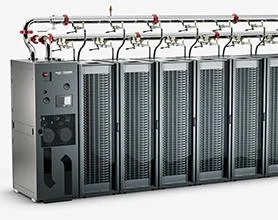
Liquid Cooling Technology moves heat away from processors using circulating liquid rather than relying only on air. In a typical direct-to-chip setup, a metal cold plate sits against a hot processor. Coolant flows through narrow channels inside the plate, absorbs heat, and carries it toward a heat exchanger. Fans may still operate, but they often face a lighter workload. Heat moves fast.

NVIDIA CEO Jensen Huang has said, “The data center is the unit of computing.” That perspective matters here: cooling is not an isolated component. Pumps, pipes, controls, servers, and facility systems must work together. In an immersion system, servers sit in a tank of electrically non-conductive fluid, which draws heat from many components at once. The warmed fluid then transfers its heat through a separate cooling loop. Details vary by design.

For readers asking how the technology works, the central idea is simple: liquid collects heat near its source, then transports it elsewhere for removal. The practical work is less tidy. Engineers must check flow rates, pressure, coolant compatibility, leak detection, and service access. A tiny fitting can deserve more attention than a large, impressive tank. Liquid cooling can support dense computing, but it does not automatically reduce every facility’s energy use. Results depend on the climate, equipment, controls, and heat-rejection method. One limitation deserves reflection: published performance figures may not match a specific site. The system must be measured in its actual operating conditions.

What Is Liquid Cooling Technology and How Does It Work?

Liquid Cooling Defined: Water’s Specific Heat Is ~4.18 kJ/kg·K at 20°C

At 20°C, liquid water has a specific heat capacity of about 4.18 kJ/kg·K. In plain terms, one kilogram of water can absorb roughly 4.18 kilojoules of heat as its temperature rises by one degree Celsius. That is a substantial buffer. In a cooling loop, a cold plate draws heat from a processor or other warm component, and moving water carries that heat toward a radiator or heat exchanger. Fans then help release it into the surrounding air. The water does not make heat disappear; it transports it.

A simple estimate uses heat transfer equals mass flow rate multiplied by specific heat and temperature change. For example, if one kilogram of water warms by five degrees, it absorbs about 20.9 kilojoules. Real systems are less tidy. Flow restrictions, contact quality, and air trapped in a loop can all affect performance. Small details matter. Water’s high heat capacity is useful, but it is not the only design factor; pressure drop and leak control matter too. A water-and-glycol mixture, often chosen for operating conditions, has different thermal properties. The 4.18 figure is a helpful reference, not a guaranteed system result. That distinction is easy to overlook.

Key Components: Cold Plates, Pumps, Coolant Lines, and Heat Exchangers

Liquid cooling carries heat directly from processors into a circulating fluid. A cold plate sits against each hot chip, with narrow internal channels guiding coolant across its surface. Heat moves into the fluid before it spreads through the surrounding air. The contact matters. Poor mounting pressure or uneven thermal paste can leave hot spots.

Pumps keep coolant moving through the loop. Their flow rate must match the heat load; too little flow can raise chip temperatures, while excessive flow wastes pumping energy. Coolant lines connect cold plates to a heat exchanger, and fittings must resist vibration and gradual wear. Small details matter. The exchanger transfers heat to a separate facility-water loop, keeping the two fluids apart.

A 2024 Lawrence Berkeley National Laboratory report estimated that U.S. data centers used 176 terawatt-hours of electricity in 2023, about 4.4% of national use. That scale makes heat removal an operational concern, not just a hardware choice.

Uptime Institute’s 2024 Global Data Center Survey reported that 22% of respondents had deployed liquid cooling in at least some IT racks. Adoption is growing, but that figure does not prove energy savings at every site. Operators still need to check coolant temperature, leak detection, pump redundancy, and maintenance access.

A tidy diagram can hide awkward realities: lines may obstruct service, and a pump failure can affect several plates at once. Liquid cooling works best when its components are designed as one monitored system.

Heat-Transfer Path: From the Chip Through Coolant to a Heat Sink

Inside a liquid-cooled computer, heat starts in the processor die. A thin layer of thermal interface material transfers it to a metal cold plate pressed against the chip. That layer matters. Even tiny air gaps can slow heat transfer, so mounting pressure and a clean contact surface affect performance. Inside the plate, narrow channels expose more metal to the moving coolant. The liquid absorbs heat as it passes through, then carries that energy away from the processor.

A pump moves the warmed coolant through tubing to a heat sink, often a radiator with many thin metal fins. Heat passes from the liquid into the radiator’s metal, then spreads across the fins. Fans push air between them and carry the heat out of the case. The cooled liquid returns to the cold plate, and the cycle continues.

The path sounds simple, but real systems have trade-offs. Flow can be uneven, dust can clog fins, and a quiet fan may remove heat more slowly. A diagram rarely shows these small complications.

Cooling Architectures: Direct-to-Chip and Immersion Systems

Direct-to-chip cooling places cold plates on heat-producing components, usually processors and accelerators. Coolant flows through small channels, collects heat, then transfers it through a heat exchanger to a facility water loop. A technician may still need fans for memory, power supplies, and other parts. The pipes help, but they do not cool everything.

Immersion systems take a different route: servers sit in tanks of electrically nonconductive fluid. Single-phase designs keep the fluid liquid; two-phase designs allow it to boil and condense. The tank can be quiet and compact, yet servicing hardware takes more planning. Fluid compatibility, leak detection, and safe handling matter. No magic.

The IEA’s Electricity 2024 report estimated data centers used about 460 TWh of electricity in 2022, with demand potentially reaching 620–1,050 TWh by 2026. That pressure helps explain growing interest in liquid cooling, though cooling alone cannot solve rising demand.

Uptime Institute’s 2024 Global Data Center Survey also tracks liquid cooling as an emerging option, with adoption varying across operators. Direct-to-chip often suits phased upgrades; immersion can fit dense deployments, but may demand deeper changes to maintenance routines. The awkward truth: teams can underestimate that change.

Thermal Comparison: Water Conducts Heat About 23× Better Than Air at 20°C

At 20°C, liquid water conducts heat at roughly 0.6 W/m·K, while still air is about 0.026 W/m·K. That makes water’s thermal conductivity approximately 23 times higher. This figure describes heat moving through the materials; it does not mean a liquid-cooled system will always run 23 times cooler. Not the whole story. Contact between the processor and cold plate, coolant flow, and radiator airflow all affect performance.

In a typical loop, a metal cold plate absorbs heat from the processor, and a pump moves warmed coolant to a radiator. There, thin fins transfer heat to air pushed through the radiator. The coolant then circulates back to the plate. Small details matter. A kinked tube or trapped air can reduce flow, while a dusty radiator can restrict airflow. I’d treat the 23× comparison as a useful property of water, not a complete cooling prediction; even coolant mixtures conduct heat differently from pure water. A temperature reading under a steady workload tells more about a specific setup than the conductivity ratio alone.